Skip to content
newways.suite

For small businesses in Germany and Spain

From a conversation to a confirmed job.

For agencies, consultancies, service providers and estate agents: clients, quotes, projects and invoices in one place. Plus a dedicated area for your clients, where they see what you choose to share.Clients, quotes, projects and invoices in one place.

€0.00 today. Free for 14 days, no payment details required. Then from €9.50 per user per month for the first twelve paid months (book by 31 December 2026), then from €19.€0.00 today. Free for 14 days, no payment details required. Then from €19 per user per month.

€0.00 today Free for 14 days then from €9.50 per user/monththen from €19 per user/month for 12 months, when booked by 31 Dec 2026 · TermsTerms

When you book by 31 December 2026: from €9.50 for the first twelve paid months.

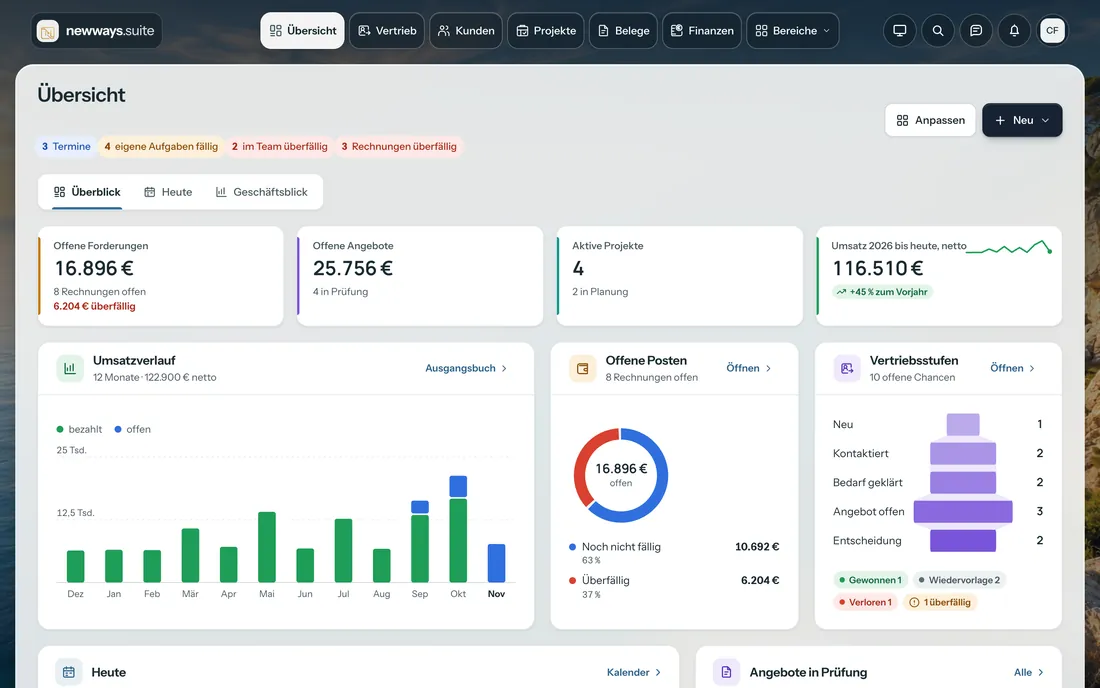
The newways.suite overview: at the top, today’s situation; below, four key figures and charts for revenue, outstanding items and sales.
Sample business. All names and figures in the images are fictitious. The screenshots show the Suite’s German interface.

For agencies, consultancies, service providers and estate agents: clients, quotes, projects and invoices in one place. Plus a dedicated area for your clients, where they see what you choose to share.

The overview

What matters today is right at the top.

One look in the morning and you know where the fires are: appointments, tasks due, unpaid invoices. Every figure leads straight to the list behind it, and everyone on the team arranges their own overview.

Enquiry · Stage 1 of 5

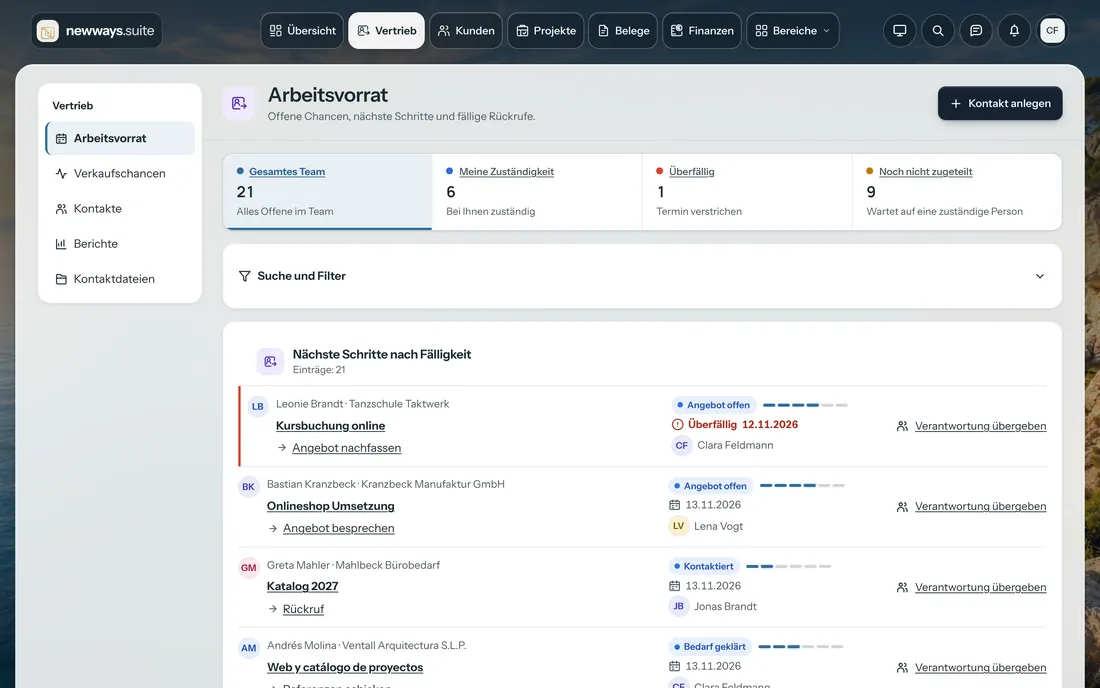
Who is calling back on Thursday?

Every enquiry gets a next step, a due date and an owner. One list shows what is due, for you or for the whole team.

Quote · Stage 2 of 5

See when your client really reads it.

Your quote goes out as a link with a PDF. Your client reads it on their phone and accepts it right there, with a signature if you wish.

In the SuiteQuote status
Status of a quote in the Suite: amount €5,640.60, status Viewed, sent 15 days ago, last opened 2 days ago.
Client viewThe quote on a phone
Quote ANG-2026-0003 in the client’s browser on a phone: status Viewed, the next step and the buttons Download as PDF, Accept quote (binding) and Decline quote.
  1. “Opened” means a person

    If WhatsApp or Teams merely loads a preview of the link, it does not count. Nor does your own click. So “viewed” really means viewed.

  2. Accept without printing

    Name, time and the text shown are recorded. The order confirmation with PDF goes out immediately.

  3. An area even before the quote

    From the very first email, you can give your prospect their own area, protected by a code sent to their inbox. Questions go to the person responsible.

Project · Stage 3 of 5

Every project shows how far along it is.

Phases, tasks, budget and time in one place. You prepare the project from an accepted quote; it is created once you confirm.

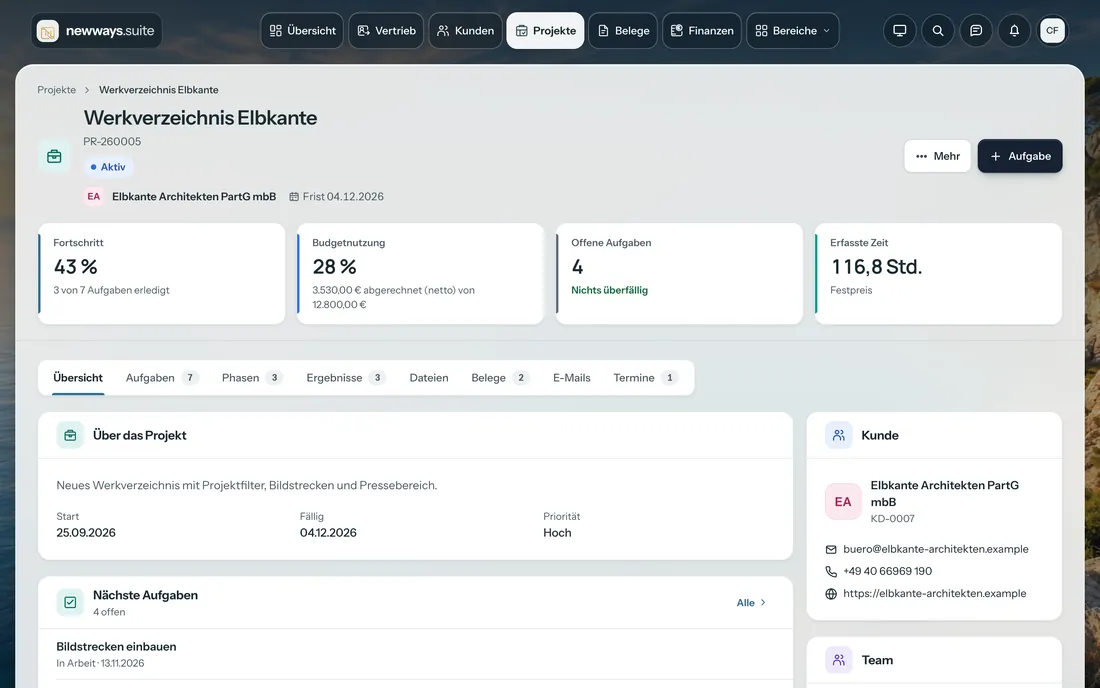
A project record
Project record Werkverzeichnis Elbkante: key figures for progress, budget, open tasks and time recorded, sections with counters, and the next tasks below.
  1. Progress and budget up front

    How many tasks are done and how much of the budget has already been invoiced. No arithmetic needed.

  2. Every section shows what is inside

    Tasks 7, phases 3, documents 2: you can see where things are before you click. If your client writes the project number in an email, it lands here by itself.

  3. What comes next

    Open tasks come first, as a list or as a board. You can complete several in one step, and undo it shortly afterwards.

Time that turns into invoices

Invoice · Stage 4 of 5

See where every invoice stands.

Draft, finalised, sent, paid: every invoice shows its path, with dates. Finalised means it can no longer be changed from then on. Whatever is outstanding is shown in large type.

An overdue invoice
Invoice RE-2026-0048 in the Suite: progress steps up to Paid, invoice text with line items and totals, and on the right the document status with €1,761.20 outstanding in red.
  1. Progress steps: draft, finalised on 8 October 2026, sent on 8 October 2026, paid, due on 22 October 2026. Below: stage 3 of 4, overdue.

    Four stages, each with a date

    Draft, finalised on 8 October, sent on 8 October, not yet paid. Because 22 October has passed, “overdue” appears below.

  2. Payment status: total €1,761.20, paid €0.00, outstanding €1,761.20 in red.

    The outstanding balance, large and red

    Total, paid, outstanding. Part payments are taken into account.

  3. Delivery: sent on 8 October 2026, last opened on 11 October 2026.

    Reminders only for what arrived

    A payment reminder only goes out for invoices that were verifiably sent or opened. Automatically 3 and 10 days after the due date; you set the stages yourself.

Payment · Stage 5 of 5

One digit too many? Nothing gets booked.

Brennkamp Haustechnik has transferred €1,761.20. You type one digit too many. The Suite asks before it books anything, and what you typed stays in place.

Try it

Unpaid invoices. One click filters.

Tap “Overdue”. Then record the payment from Brennkamp. The typo is already in the field.

Unpaid invoices in the sample business
InvoiceOutstandingDueStatus
Brennkamp HaustechnikRE-2026-0048
€1,761.2022/10Overdue
Sofia MarchettiRE-2026-0041
€1,190.0030/10Overdue
Nordquell WerbeagenturRE-2026-0046
€3,252.7005/11Overdue
Physiopraxis LindengrundRE-2026-0054
€773.5019/11Sent
Elbkante ArchitektenRE-2026-0052
€2,100.3522/11Partly paid
Kranzbeck ManufakturRE-2026-0056
€2,891.7025/11Sent

To read without JavaScript: if a payment you record is well above the outstanding balance, the Suite does not book it. It asks first and keeps what you entered. One click on a total filters the list to exactly those invoices.

The original in the SuiteThe same notice in the Suite. What you typed stays; nothing has been booked.
Detail from the Record payment dialogue in the Suite: amount 17612,00, below it the notice that the amount is well above the outstanding balance of €1,761.20, and the checkbox Yes, record this amount anyway.
In the history of every invoiceOpened by the client, then two automatic reminders. Never more than one a day.
History of an invoice: reminder sent 10 days overdue, reminder sent 3 days overdue, opened by the client on 9 October 2026.

Small things that save trouble

Client portal

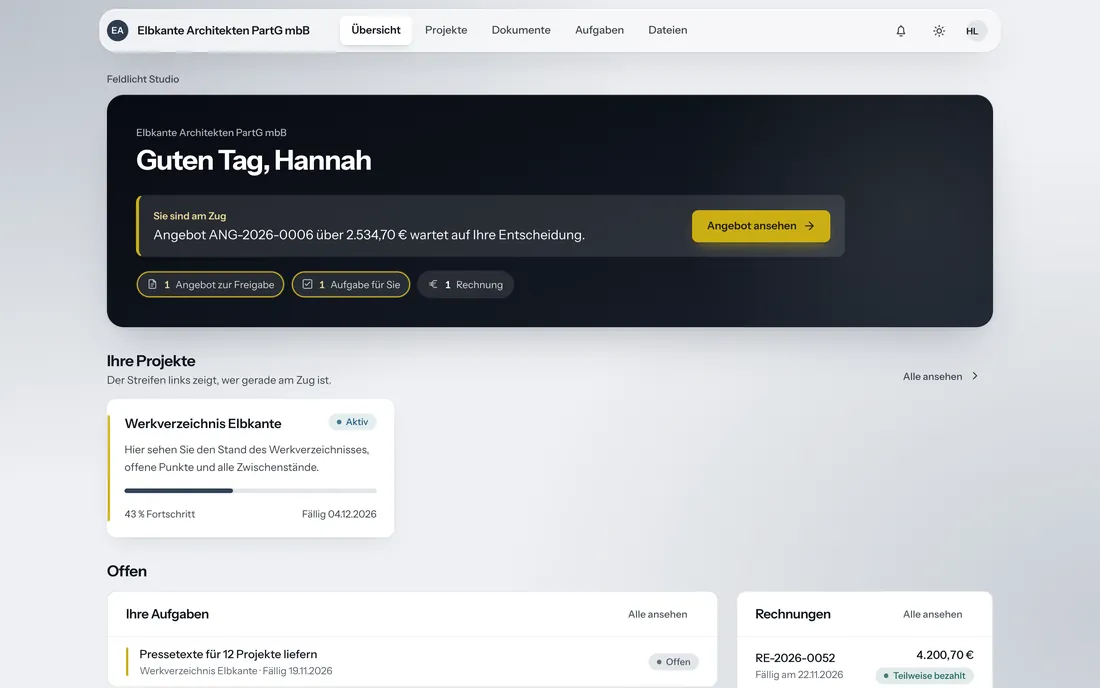
Your client knows when it is their turn.

Every client gets their own area, in your brand and in German, English or Spanish. There they see only what you share: projects, quotes, invoices and their tasks. Client access is free of charge.

Inbox and companion

A suggestion is still a suggestion.

The assistant reads an enquiry and suggests what to do: create the client, draft a reply, note a task. You review and decide. Without your click, nothing is created, booked or sent.

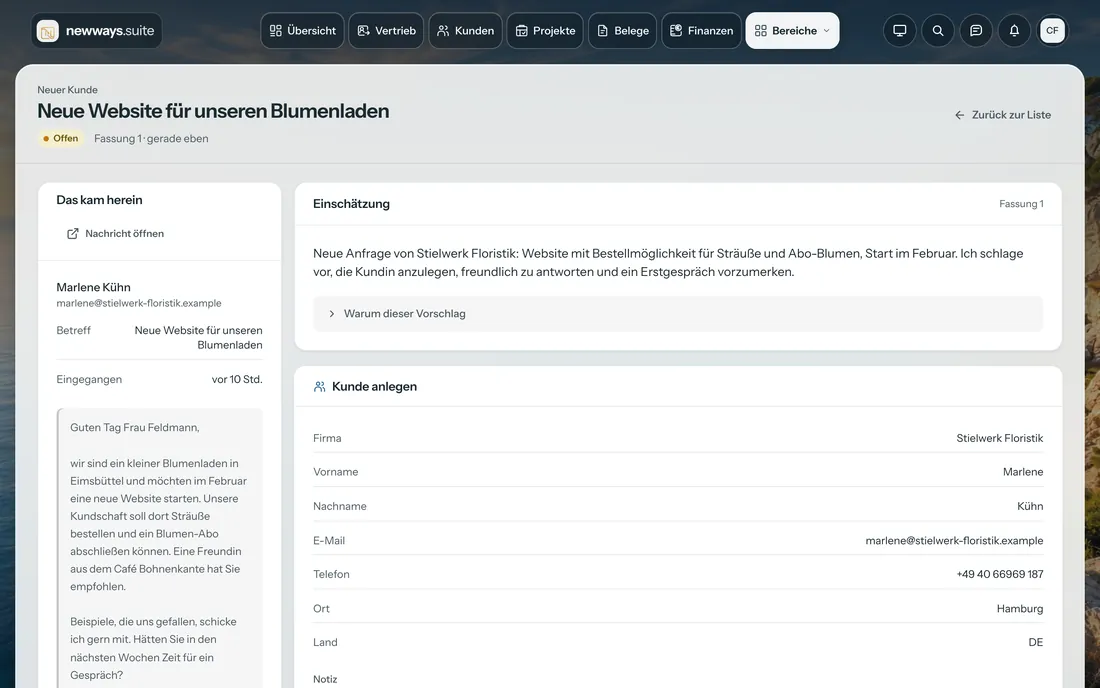
An enquiry in the inbox
The assistant’s suggestion for an enquiry about a new website for a flower shop: the message on the left; on the right, the assessment and the suggestion Create client with the fields already filled in.
  1. The assessment first

    At the top, two sentences say what it is about and what the assistant suggests.

  2. Fields already filled in

    Name, email, phone, town: taken from the enquiry for you to check. Nothing is created until you apply it.

  3. Every version is kept

    If something is not right, say in one sentence what should be different. Version 2 is created, version 1 is kept, and “What has changed” shows the difference.

Section How should it continue: 1 Apply, 2 Do it differently, with a field for your own words, 3 I would rather do it myself. Below: As long as you do nothing, nothing happens.

You decide

Apply it, have it redone based on your own words, or do it yourself. As long as you do nothing, nothing happens.

Companion beside a project record: the request Book 1.5 hours for image series, below it the suggestion card Record time 1:30 with the buttons Apply and Discard.

The companion beside every page

Ask what is still open for a client, or say: “Book 1.5 hours.” It puts down a card. Nothing is booked until you click “Apply”. What you dictate appears in the field first, and in user guide mode it names the relevant place in the manual.

You switch on the assistant and the companion under Settings → Assistant. Analysis by the digital assistant uses Anthropic; dictation and read-aloud use ElevenLabs. Both process content in the USA; the features can be switched off.

Email, phone and letters

Mailbox: Gmail, Microsoft 365, iCloud or another mailbox; sent emails stay in the archive with their attachments. Phone: call with one click from the contact record, using a softphone on your computer. Newsletter: sync consent with Mailchimp; newsletters are designed and sent in Mailchimp. Letters: as a PDF with letterhead and signature, and by post for a fee if you wish.

For estate agents

From property to brochure.

The property module is included in every plan and switched off by default. You switch it on when you need it: properties, brochures in three languages, search profiles and prospective buyers or tenants. Owners see their property in the client portal, but never the names of interested parties.

In the SuiteA property record
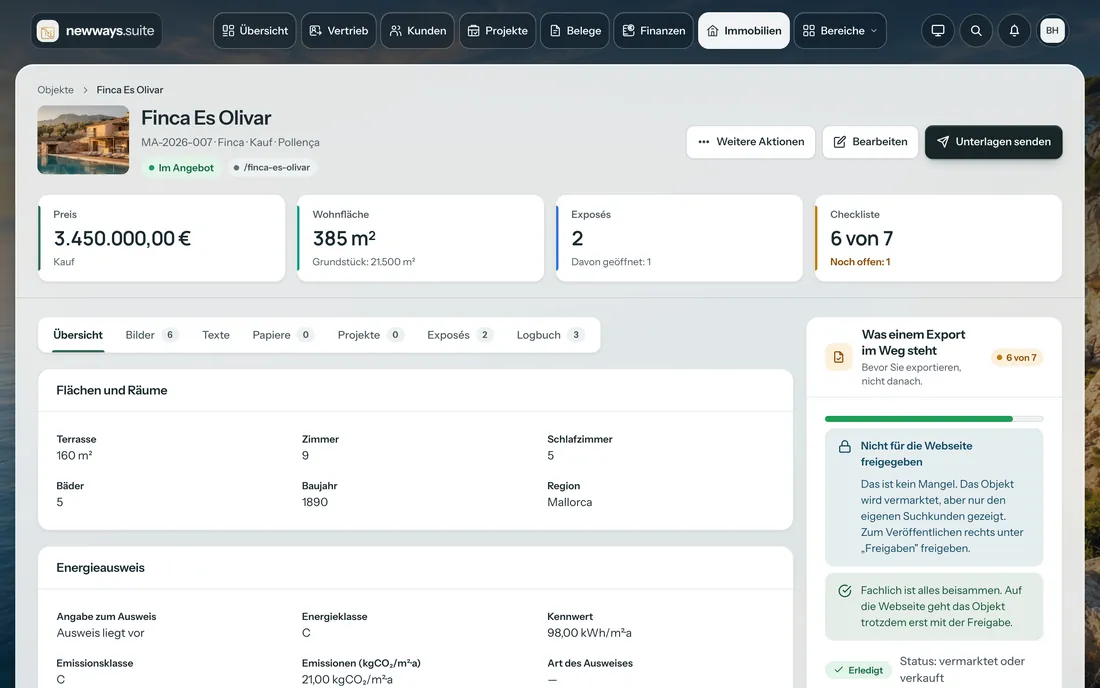
Property record Finca Es Olivar: key figures for price, living area, brochures and checklist 6 of 7, sections with counters, areas and rooms, and on the right the box What is blocking an export.
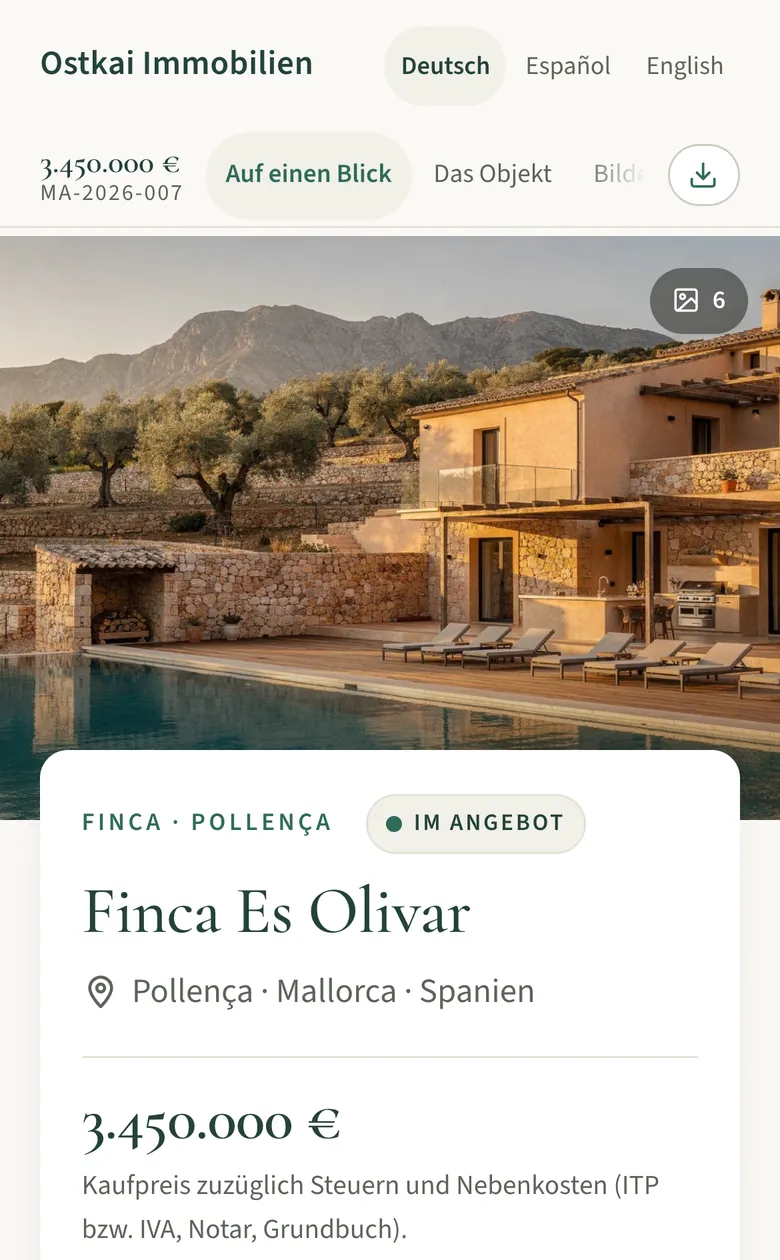
Client viewThe brochure as the enquirer sees it
Online brochure Finca Es Olivar on a phone: language choice Deutsch, Español, English, large cover image, purchase price and key facts.
  1. Check first, then publish

    6 of 7: the Suite tells you what is still missing before a property goes to your website or a portal (OpenImmo portals, and Idealista with your own portal agreement).

  2. Everything in one record

    Images, texts in three languages, documents, brochures and log. Small numbers on the sections show how much is already there.

  3. Brochures in three languages

    Your enquirer reads it in German, Spanish or English, in your brand, and also as a PDF with a QR code. If the link has expired, they see your contact details instead of an error page.

  4. The property adviser sticks to the brochure

    It answers only from the brochure and never gives a figure that is not stated there. Questions about price, commission, appointments or legal matters go straight to you.

Pricing

Three plans. Your clients join free of charge.

Free for 14 days, no payment details required. After that, you pay per user per month. If you switch to a smaller plan, you lose no data.

  • Basis

    To get started.

    €9.50€19per user per month, excl. VAT

    12 paid months, then €19

    When you book by 31 December 2026: €9.50 for the first twelve paid months.

    • 100 clients, 50 projects
    • 600 documents a year, such as quotes and invoices
    • 1 mailbox, 3 GB storage
    • 300 assistant requests a month
    Try Basis for 14 days
  • Plus

    When several mailboxes need to be in the Suite.

    €14.50€29per user per month, excl. VAT

    12 paid months, then €29

    When you book by 31 December 2026: €14.50 for the first twelve paid months.

    • 500 clients, 250 projects
    • 3,000 documents a year
    • 3 mailboxes, 20 GB storage
    • 1,500 assistant requests a month
    Try Plus for 14 days
  • Pro

    With a client area at your own address.

    €19.50€39per user per month, excl. VAT

    12 paid months, then €39

    When you book by 31 December 2026: €19.50 for the first twelve paid months.

    • Unlimited clients, projects and documents
    • 10 mailboxes, 100 GB storage
    • Client area at your own address (domain)
    • 5,000 assistant requests a month, priority for your queries
    Try Pro for 14 days

Introductory offer: 50% off the regular monthly price for the first twelve paid months, for new online bookings made on or before 31 December 2026 (mainland Spain time); cannot be combined with the annual discount. Enterprise is excluded from the offer.

For businesses and self-employed professionals only; prices exclude applicable VAT. Allowances apply per plan, not per user. Annual billing on the booking page: twelve months for the price of ten. More than 25 users: Enterprise, by personal consultation only.

All allowances and terms

Your workspace

Your work, your background.

In the Suite, your work sits on a calm surface above an image of your choice. Nine backgrounds, light, dark or matching your system, plus a focus mode. Try it out here: this page will then take on your background.

Choose a background

The Suite’s nine backgrounds. With JavaScript switched on, you can try them out here.

The backgrounds are artistic images, not photos of real places.

Questions

Before you book.

Who is the Suite for?

For self-employed professionals and small businesses that work on commissioned jobs: agencies, consultancies and other service providers. With the property module, for estate agents too. For tax purposes, the Suite is designed for Germany and the standard VAT (IVA) territory in Spain; the Canary Islands, Ceuta/Melilla, foral arrangements and special tax regimes require a separate review with your accountant.

What happens after the 14 days, and how do I cancel?

When you book, your contract starts immediately: the first 14 days are free. If you cancel during that time, you will not receive an invoice. Unless you cancel, your chosen subscription then continues as a paid plan. You can cancel in your account under “My contract” or in writing. Monthly contracts can be cancelled effective at the end of the current billing period. With annual billing, a notice period of 30 days to the end of the annual period applies. During the initial free period, the contract ends immediately.

Is the introductory offer a permanent discount?

No. For new online bookings made on or before 31 December 2026, the discount applies to the first twelve paid months after the trial period. The regular price of your chosen plan applies after that. It cannot be combined with the annual discount.

Do I need to install anything, and does it work on a phone?

No, the Suite runs in the browser; there is nothing to install. It adapts to small screens, and a bar at the bottom takes you through the areas. Your team chooses German, English or Spanish. Documents, the client portal, brochures and sign-in are available in all three languages; some administration areas and the manual are in German.

How do I move over from my current software or from Excel?

You import clients from a spreadsheet with up to 2,000 rows, and see a preview first. Contacts come from Google, Outlook, LinkedIn or as vCard, also checked before import. If you create a client who already exists, the Suite warns you.

Where is my data stored, and who can see it?

Operation, storage and backups are with Mittwald in Espelkamp, Germany. Backups are made daily and kept for 30 days. Your data is not used to train AI models. Support can only look in with your permission: using a code you receive by email, for no more than two hours, with every step logged.

Can I take my data with me?

Yes, on every plan: every list as CSV, everything together as an archive. After your contract ends, your data remains readable for 30 days. If you reach a limit of your plan, you simply cannot create anything new; everything you already have remains visible.

Does the Suite connect directly to my bank?

No. You download your bank statement from your bank as a file (CSV or camt.053) and import it. The Suite suggests matches, and you confirm them. No bank login details are needed.

What does my accountant receive?

A handover package with a report, spreadsheets and original documents, and a DATEV posting batch after confirmed account mapping if you wish. With the “Bookkeeping / Tax adviser” role, your accountant can also review everything directly in the Suite. The Suite does not replace tax advice and does not file tax returns.

What about the tax office and tax audits?

The Suite creates procedural documentation (Verfahrensdokumentation) from the actual state of your setup, logs all tax-relevant changes and provides data access for a tax audit. A payment recorded in error is reversed with a reason, never deleted. This is not a certification; your accountant remains the right point of contact for your tax obligations.

Which e-invoice formats does the Suite support, and what about VeriFactu?

German businesses use ZUGFeRD/Factur-X with PDF/A-3b and XRechnung. Spanish businesses use VeriFactu once it has been set up with a certificate. After checks in the test environment, the production environment can be used as soon as the signed manufacturer declaration for this software version has been released. Incoming e-invoices are read automatically. There is no Peppol connection. The manufacturer declaration is a declaration by the manufacturer; it is not certification by the AEAT. Published manufacturer declarations

Who helps me if I get stuck?

In user guide mode, the companion answers questions about using the Suite and names the relevant place in the manual. There is also Support. Would you rather talk to a person? Marco Lohmann will show you the Suite in 15 minutes, using a typical job: Request a demo by email.

Where can I find the privacy policy and contract terms?

You can find the current legal information at newways.consulting and in the Suite’s booking process. The terms that apply to your booking are also shown there.

Try the Suite on your next job.

Free for 14 days, then from €9.50 per user per month for the first twelve paid months (when you book by 31 December 2026), then from €19.Free for 14 days, then from €19 per user per month. To pay today: €0.00.

No payment details required. Your contract starts when you book; fees apply after 14 days unless you cancel.